
Can AI color line art? Here are the surprising results
In the evolving world of AI, there is a tool for nearly everything. With over 350,000 AI projects and counting, industries are being transformed, including the art world. While some artists remain skeptical or opposed to using AI in their craft, the idea of AI assisting in certain aspects of art creation is intriguing. Can AI color line art? This article explores the surprising results from two popular AI tools, Clip Studio Paint and Petalica Paint, and investigates whether they can provide artists with a time-saving starting point or if it’s just marketing hype.

The Intersection of AI and Art
In the rapidly evolving world of technology, AI (Artificial Intelligence) has become a powerful tool across various industries. The art world is no exception, as artists explore the possibilities of using AI to enhance their creative process. One particular area where AI has shown promise is in assisting with art coloring. Imagine being able to experiment with different color palettes for your line art without having to manually paint them. In this article, we will delve into the intersection of AI and art coloring, exploring the tools available and their potential benefits.

Tools for AI-Assisted Art Coloring
There are several AI-powered tools available that offer assistance in coloring line art. Two notable contenders in this space are Clip Studio Paint and Petalica Paint. These digital art tools utilize machine learning algorithms to automatically add color to line drawings, providing artists with a time-saving starting point.
Clip Studio Paint
Clip Studio Paint is a popular choice among digital artists, offering a wide range of features such as embedded 3D reference models, comic panel templates, and 2D animation capabilities. Recently, the software introduced an AI colorizing feature. This feature, known as the Colorize command, leverages machine learning to automatically fill line art with color.
To test out the Colorize feature in Clip Studio Paint, I created a line art drawing and selected the Colorize option from the Edit menu. Surprisingly, the first result was not as expected. The AI seemed to struggle with accurately coloring the image, resulting in a dark face and some areas not staying within the lines. Though the overall effect resembled a pastel watercolor look, there were some inconsistencies in the coloring.
However, Clip Studio Paint offers another option for AI-assisted coloring called “Colorize with hints.” This feature allows artists to provide the AI with guidance by creating a new layer and adding basic shapes and hues. By selecting the line art layer as a reference and using the Colorize option with the hint image, the AI creates a new layer with color based on the provided reference. While this method yielded a better result than the first attempt, it still fell short compared to manually coloring with a personal color layer.
Petalica Paint
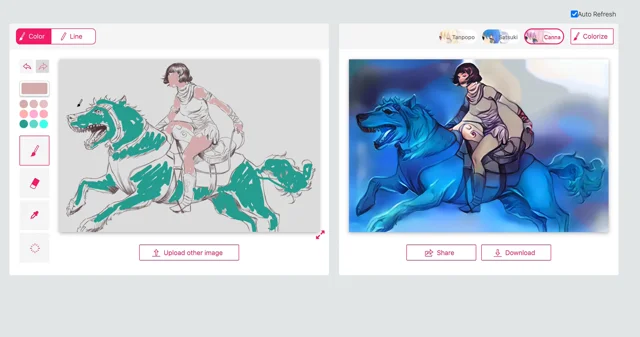
Petalica Paint is another AI coloring tool that aims to assist artists in adding color to their line art. Unlike Clip Studio Paint, Petalica Paint is completely free to use. The software offers three different colorization styles: Tanpopo, Satsuki, and Canna.
Using the same line art image as before, I uploaded it to Petalica Paint and was shown a result almost instantly. However, the initial results were similar to Clip Studio Paint, with the coloring appearing dark and blob-like in detailed areas such as the face and mouth of the horse-dog. Additionally, the line art had a strangely embossed look.
Petalica Paint also provides a color hinting option, allowing artists to paint colors over the line art to guide the AI. Unfortunately, the brush tool for hinting lacked size adjustments, making it difficult to apply the colors precisely. The end result was even less accurate than the previous attempt, with the AI ignoring the areas I had colored.

Are We There Yet?
While AI-powered tools like Clip Studio Paint and Petalica Paint offer a starting point for coloring line art, it is clear that they still require a human touch to achieve the desired result. These tools can provide a basic color scheme, but the nuances of shading, blending, and other artistic techniques are best left to the artist.
It is surprising to see that AI shows more potential in creating images from scratch than in coloring existing ones. However, it is important to note that AI technology is rapidly evolving, and it is likely that in the future, we will witness significant advancements in AI-assisted art coloring. While we are not quite there yet, the possibility of being able to click “colorize” and transform sketches into painted masterpieces is not far-fetched.
In conclusion, AI-assisted art coloring tools like Clip Studio Paint and Petalica Paint offer a glimpse into the future of art creation. While they may not be perfect in their current state, they provide artists with a starting point and inspiration for their coloring process. As technology continues to advance, we can expect AI to play an increasingly important role in the art world, pushing the boundaries of creativity and enabling artists to explore new horizons. So, keep an eye on the intersection of AI and art, as it promises exciting possibilities for artists everywhere.
Source: https://megapencil.co/can-ai-color-line-art-here-are-the-surprising-results/